Finance Hub
Finance Hub for members
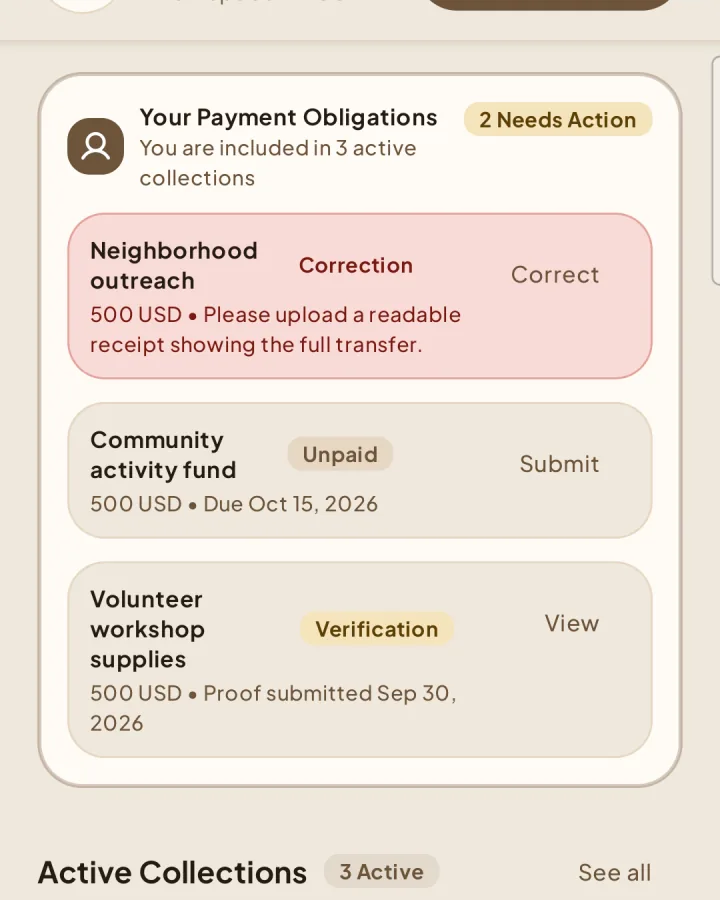
See what you owe, submit proof after paying, and follow the review.
Understand an obligation
1A collection assigns a fixed amount in the workspace currency, payment instructions, and an optional due date. Due dates help prioritize work but do not automatically close the collection.
Submit payment proof
Pay using the external instructions shown in Shapers.
2Open the obligation and choose Submit proof.
Attach one or two clear screenshots of the payment proof, then submit. You cannot attach more than two screenshots.
Wait for Finance review.
Correct rejected proof
3If a reviewer requests a correction, read the reason, replace or remove evidence as needed, and resubmit. You cannot change proof that is awaiting review or has already been confirmed.
Your payment history
Confirmed payments appear in your personal history. Shapers records payment evidence and status; it does not move or process the money.