Meetings
Create and host meetings
Schedule a meeting, shape its agenda, and run attendee check-in.
Schedule a meeting
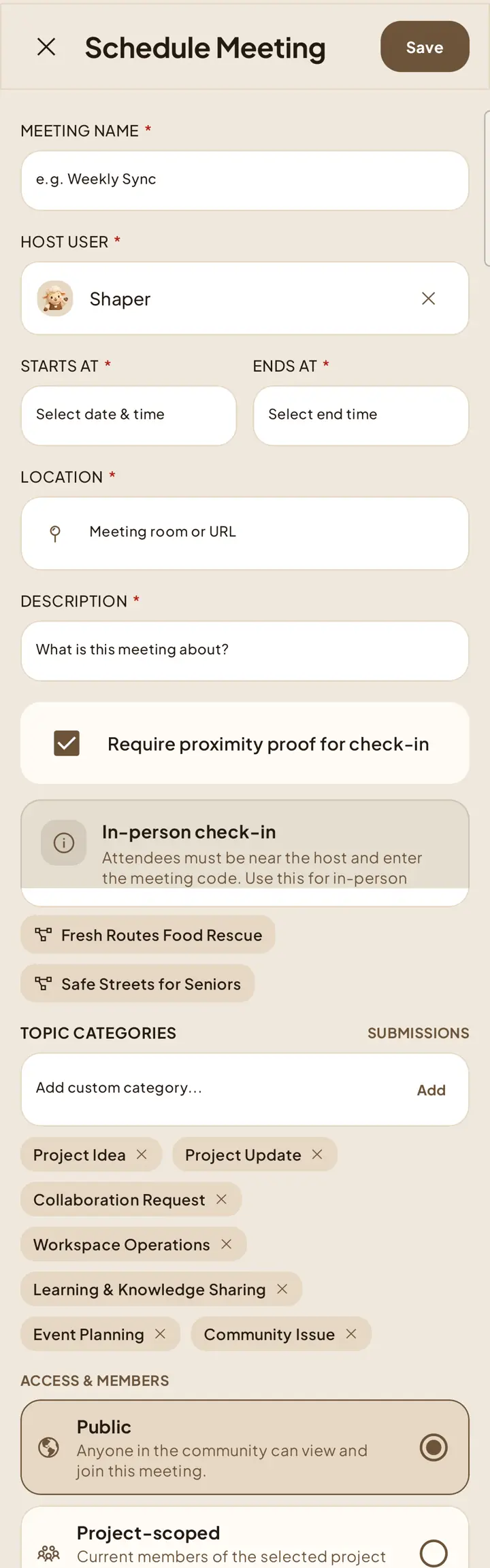
Open Meetings and press the plus action.
Add the meeting name, host, start and end times, location, and a concise description.
Choose a project when the meeting belongs to one, set its access, then save.
Choose the check-in method
Require proximity proof determines whether attendees must be near the host. When enabled, attendees must be nearby and enter the meeting code. When disabled, they use the code without nearby-device verification. This setting cannot be changed after check-in starts.
Set topic categories
Add or remove meeting categories when scheduling or editing the meeting. Members can use a category when submitting a topic, or leave the category unset.
Host check-in
Start the check-in session from 15 minutes before the scheduled start. The session window remains available until 15 minutes after the scheduled end.
Share the active meeting code with attendees.
For proximity check-in, keep the host device nearby and available while attendees verify.
Stop the session when check-in is complete.